
How do I choose and reorder the columns?
Open Customize Columns from the column icon in the table to add, remove and drag the columns of the Ads Manager table.
Open Customize Columns
- On desktop, find the column icon in the top left corner of the campaign table (tooltip Customize Columns).
- Click it. The Customize Columns window opens with the line Drag and drop the order of your columns.
A strip at the top of the window previews the current column order from left to right.
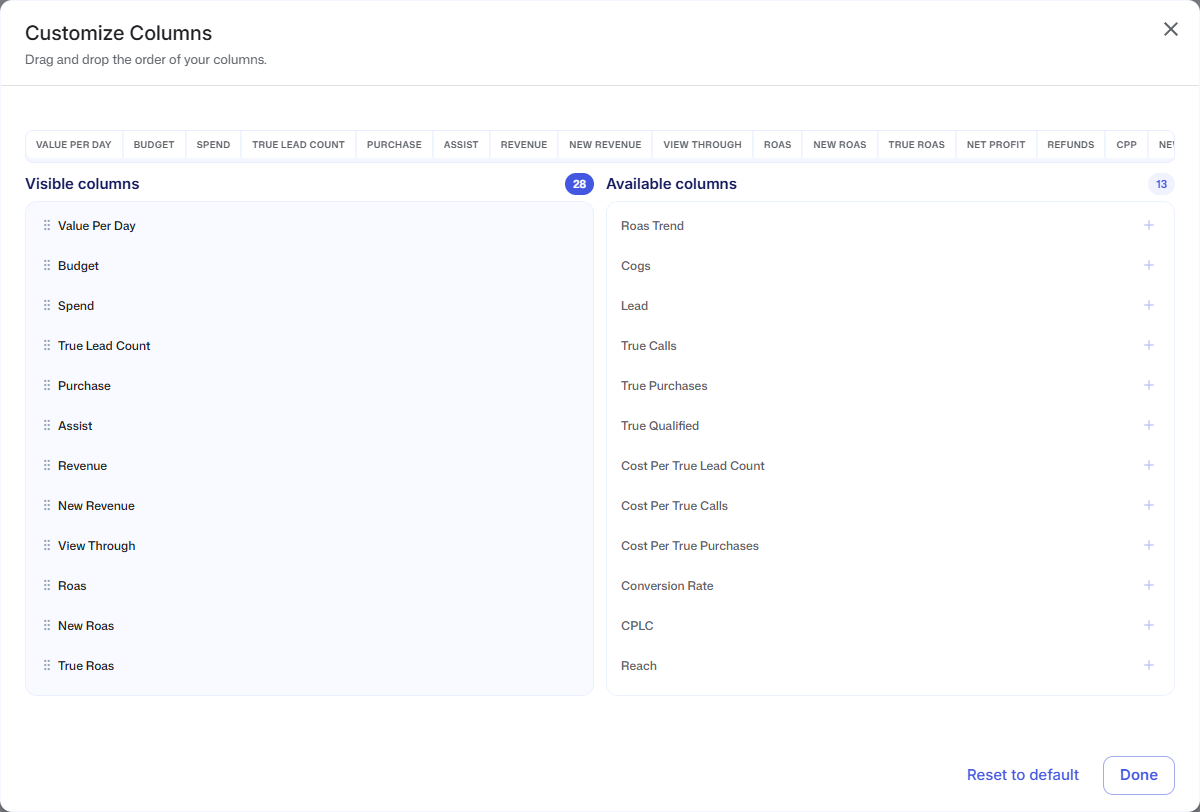
Add, remove and reorder
- Visible columns lists the columns in your table, in order. Drag a row by its handle to move it. Hover over a row and click the X to remove it.
- Available columns lists every column you can add. Click a row, or its +, to add it to the end of the table. When nothing is left to add, the list reads All columns are visible.
- Reset to default puts the standard columns back in the standard order. You will see Reseted to default columns.
- Done closes the window.
Every change is saved the moment you make it. You will see Saved new column order after a drag and Saved new columns after adding or removing a column. If a new column order cannot be saved, you see Trouble saving columns. If a reset fails, you see Error reseting to default columns.
The standard columns
After Reset to default, the table shows these columns from left to right: COGS, Trend, Budget, Spend, Sales, NC Sales, View-Thro, ROAS / POAS, 1D | 3D | 7D, NC ROAS, True ROAS, Conversion, New Customers, Assist, Profit, Refunds, CPA, NC CPA, AOV, Discrepancy, Frequency, CPM, Impressions, ATC, Clicks, Inline Clicks, CPC, CPLC and CTR.
If you have never changed your columns, your table shows these columns without True ROAS, although this window lists True Roas under Visible columns. Any change in this window, such as moving a column or clicking Reset to default, adds it to the table.
Good to know
- Your columns are saved to your login. Other people on the store keep their own layout.
- The column icon and the Customize Columns window are desktop only. On mobile the campaign cards show a fixed set of numbers.
- Columns only change the table. The CSV export from Export Campaign Data always contains the same set of metrics, no matter which columns you show.
- COGS is always the first column, so moving or removing Cogs in this window does not change the table. If you remove Roas Trend, the 1D | 3D | 7D column comes back next to ROAS / POAS.
- You cannot rename a column or add a column that is not in Available columns.
- Some columns have a different name in this window than in the table header. See What do the columns in the Ads Manager mean?.
- To sort by a column, click its header in the table. See How do I search campaigns, pick a platform and sort the table?.