
What is the difference between the Meta Campaign Name Filter and Campaign Auto-Filters?
The Meta filter is one text that hides Meta campaigns and their spend for the whole store, while Campaign Auto-Filters only change your own table.
Two filters, two jobs
Both filter campaigns by their name, but they work at different levels.
| Meta Campaign Name Filter | Campaign Auto-Filters | |
|---|---|---|
| Platforms | Meta only | Every connected ad platform |
| Keywords | One text; only campaigns containing it are kept | Many keywords, both include and exclude |
| Who and what it affects | The whole store. It hides Meta campaigns in the Ads Manager and narrows Meta spend and the numbers Meta reports on the Dashboard, not the sales TrueROAS tracked | Your login, only the Ads Manager table. Team members with no keywords of their own use the store owner's list |
Meta Campaign Name Filter
Use it when your Meta ad account also runs campaigns for another store or brand, and you want to hide those campaigns and their spend.
- On desktop, click the gear icon (tooltip Attribution and filtering settings).
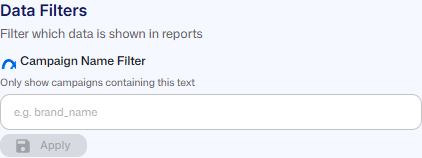
- Under Data Filters (Filter which data is shown in reports), find Campaign Name Filter with the Meta logo (Only show campaigns containing this text).
- Type the text, for example brand_name, and click Apply. You will see Meta campaigns filtered to "brand_name" and an Active badge next to the title.
- To remove it, click Clear. You will see Meta campaign filter cleared.
Apply stays greyed out until the text differs from the saved one, and reads Saving... while it saves. Under the box, Current: shows the saved text. The X inside the box only empties the box; nothing changes until you click Apply or Clear. If saving fails you will see Error saving filter. Please try again., or Error clearing filter. Please try again. when clearing.
Capital letters do not matter. The section only appears when a Meta ad account is connected, and the same section is under General Settings > Store Settings > Reporting Settings > Meta Filters.
The filter narrows what comes from Meta: the campaigns in the Ads Manager, Meta spend and the numbers Meta reports on the Dashboard. It does not filter the sales TrueROAS tracked. In the Ads Manager, sales from hidden campaigns show under Organic & Unassigned, among the Meta ads (untracked) rows, and still count in the Summary row. The Meta sales on the Dashboard still include them.
Campaign Auto-Filters
Use them to tidy up your own view of the table, for example to hide test campaigns or to see one product line. Your keywords are saved to your login, and team members who have not added any keywords of their own use the store owner's list. They take many keywords, can both include and exclude, and work on every platform. See How do Campaign Auto-Filters work?.
Google campaigns
There is a matching Campaign Name Filter for Google Ads, but it is not in the gear panel. Find it under General Settings > Store Settings > Reporting Settings > Google Filters. It works like the Meta one: one text for the whole store that hides Google campaigns in the Ads Manager and narrows Google spend and the numbers Google reports on the Dashboard, but not the sales TrueROAS tracked.
Good to know
- The Meta Campaign Name Filter is saved for the whole store. Everyone's Ads Manager and the Meta spend on the Dashboard change with it. Anyone on the store can set or clear it, not only the store owner or an admin. See What can team members see and change on the Dashboard and Ads Manager?.
- Campaign Auto-Filters are saved to your login and never change the Dashboard totals. Team members who have not added any keywords of their own use the store owner's list.
- The Meta filter takes one text. It cannot take several texts or an exclude text; use Campaign Auto-Filters for that.
- The gear panel is desktop only. General Settings > Store Settings > Reporting Settings has the Meta filter, the Google filter and Campaign Auto-Filters.
- Both filters read campaign names only, not ad set or ad names.