
How do I find, rename or delete my Trew chats?
Your open Trew chats sit as tabs above the conversation, and every chat is saved in the Chats list, where you can search, rename and delete it.
Open chats as tabs
Above the conversation, a row of tabs shows your open chats. New chat is always first and starts a new chat. Up to four open chats follow it.
- Click a tab to switch to that chat.
- Click the x on a tab to close it. The chat is not deleted. You find it again in Chats.
- A pulsing dot on a tab means Trew is still working in that chat.
- A solid dot with the tooltip New answer means Trew answered in that chat while you had another tab open.
Find an older chat
- Click Trew in the left menu.
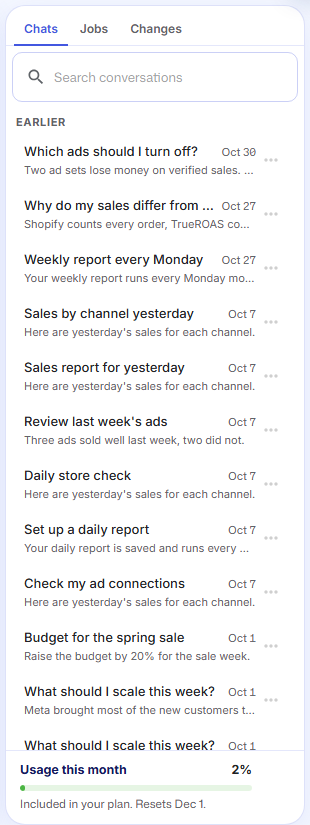
- In the panel on the right, click Chats.
- Your chats are grouped under Today, Yesterday, This week and Earlier. Each row shows the chat's name, when it was last used and the start of the last message.
- To find one, type a word in Search conversations. When nothing matches, the list says No conversations match your search.
- Click a chat to open it.
When Trew is open in the panel next to a page, click the clock button on the left edge of the panel. Its tooltip reads Recent chats. Click a chat to open it. To rename or delete chats, click Open in full page at the top of the panel first.
Rename a chat
- In Chats, move your mouse over the chat and click the three dots on its row.
- Click Rename.
- In Rename this chat, type the new name and click Rename.
Delete a chat
- In Chats, click the three dots on the chat's row.
- Click Delete.
- Delete this chat? opens. It says the chat and its messages are removed for good and that this cannot be undone.
- Click Delete.
Read older messages in a long chat
A long chat opens at its newest messages. Click Show earlier messages at the top of the chat to load older ones. When you have scrolled up, click the arrow button with the tooltip Jump to the latest message to go back to the bottom.
Good to know
- Your chats are saved to your login and to the store you have open. Others on your team do not see them, and when you switch stores you see that store's chats.
- The Chats list shows your 50 most recent chats for the store, and search looks through those.
- Which tabs are open is remembered in this browser only.
- A deleted chat cannot be brought back.
- Chats you have with Trew while you build a report on the Reports page are not in this list. They stay with the report.
- On phones the panel with Chats does not show, but the tabs do. Rename and delete need a larger screen.