
How do I count an unknown source as one of my channels?
Add a source rule so sales from a source TrueROAS does not recognise count as a channel such as Facebook, Instagram, TikTok or Email.
What a source rule does
Attribution is how TrueROAS decides which ad or channel gets the credit for a sale. When a visit comes from a source TrueROAS does not recognise, such as a campaign name you put on links in your own posts, the sale lands under Organic & Unassigned in the Ads Manager. A source rule tells TrueROAS which channel that source belongs to.
A rule matches every unknown source whose name contains your text. It does not matter whether the letters are upper or lower case.
Add a rule from the Ads Manager
- In the Ads Manager, open Organic & Unassigned. See What is Organic & Unassigned and what do its rows mean?.
- On the row of the source, click the tag icon (Set channel). It shows on sources TrueROAS does not recognise and on groups of sources with a similar name, on a computer and on a phone.
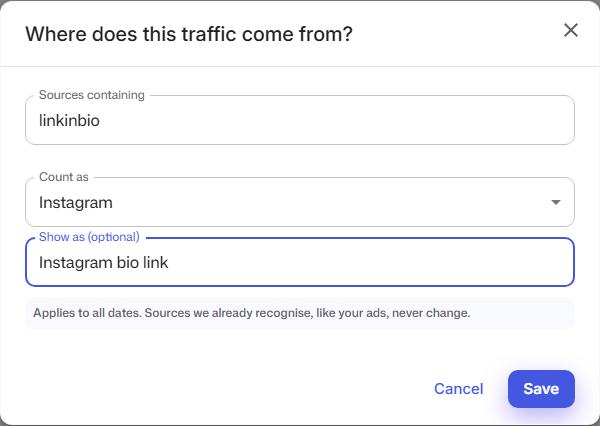
- The window Where does this traffic come from? opens with the source name already in Sources containing. Shorten it to the part all these sources share. It needs at least 3 characters, otherwise you see Use at least 3 characters.
- Under Count as, choose the channel: Facebook, Instagram, TikTok, Pinterest, Snapchat, Google organic, Email, WhatsApp or Direct.
- Optional: under Show as (optional), type the name the source should show with. The field suggests e.g. Meta Organic Post. Leave it empty to keep the source's own name.
- Check the line that counts the sources under Organic & Unassigned your rule would catch, such as Matches 3 sources in this date range.
- Click Save. You will see Rule saved.
The window also says Applies to all dates. Sources we already recognise, like your ads, never change.
Add or change rules in Settings
- Click Settings at the bottom of the left menu and open the Reporting Settings tab.
- Under Sources and filters, find Source rules (Count unknown sources as one of your channels).
- Under Your rules, each rule reads Contains your text, an arrow and the channel, with shown as and the name under it when you gave one.
- Click Add rule to add one, the pencil (Edit rule) to change one, or the bin (Delete rule) to remove one.
Add rule and the pencil open the same window as in the Ads Manager, Where does this traffic come from?. Fill it in as described above and click Save.
The bin deletes the rule at once, without asking first. You will see Rule deleted. If saving fails, you will see Could not save. Please try again.
With no rules yet, the card reads No rules yet. Add one when you know where an unknown source comes from, like campaign names from your organic posts.
What changes
- The sales of the matching sources move from Organic & Unassigned to the channel you chose, for every date, past ones too.
- With a Show as name, the sources show under that name.
- The new channel and name also show in Customer Journeys and Order Flow.
- A rule changes only the channel and the name of a visit. It never changes which visit gets the credit for an order.
- A rule set to Facebook or Instagram counts as Meta Ads, unless you turn on Show organic Facebook and Instagram separately. See How do I see organic Facebook and Instagram sales separately?.
Good to know
- Rules apply to the whole store, so everyone on the store sees the same numbers.
- Only the store owner or an admin can save a rule. On Reporting Settings the buttons are greyed out for everyone else, and in the Ads Manager they see Only the owner or admin can change this setting globally and nothing is saved.
- A rule never changes a source TrueROAS already recognises, such as your ads, an ad platform or a coupon.
- You cannot create a new channel. A rule can only use the channels in the Count as list.
- If a source carries a code that also starts the name of one of your Meta ads, see How do I credit sales from link codes to my Meta ads?.
- Why an order shows a source you did not expect is explained in Why does an order show Direct, Other source or a channel I did not expect?.