
DocsReports
How do I change, save or copy a report written with Trew?
Ask Trew for a change in the panel beside your report, click Save to keep it, or duplicate a report someone else made to get your own copy.
Change a report
- Open the report from Reports.
- In the Trew panel on the right, under Ask for a change and Trew edits the report., type what you want changed, for example a shorter summary or one section left out.
- Send it. Trew changes the same report, and a thin line moves along the top of the report while it updates.
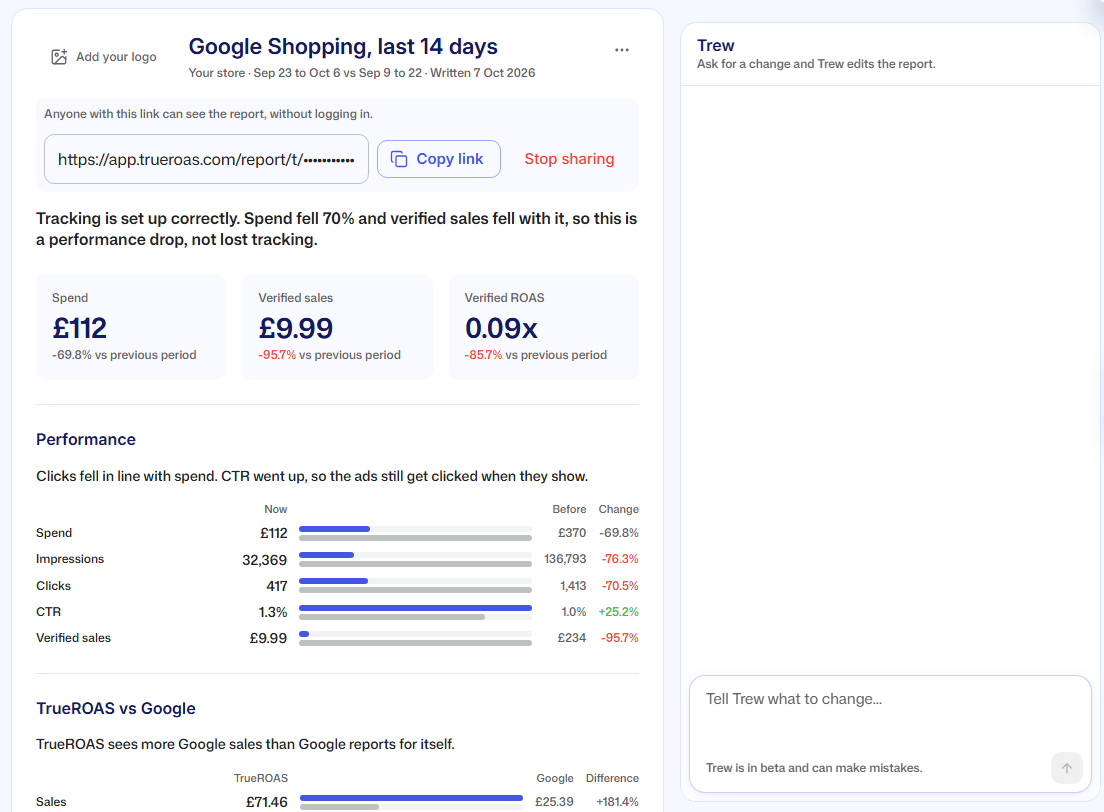
On a phone, the panel is the Trew tab. When Trew has changed the report, the page goes back to the Report tab.
You can keep asking for changes after you have saved the report.
Save a draft
A report Trew has just written has a grey Draft label, next to its title and on its card on the Reports page. Click Save to keep it as a finished report, and the label goes away. Sharing a draft with Share report saves it too.
Copy a report someone else made
Only the person who created a report can change it. Everyone else on the store sees the report without the Trew panel, and with a Duplicate button.
- Open the report and click Duplicate. On the Reports page you can also click ... on its card and pick Duplicate.
- Your copy opens, marked Draft. It belongs to you, so you can change it with Trew and save it.
If something goes wrong
| Message | What to do |
|---|---|
| This report belongs to another store. Switch to that store to edit it. | Switch to the store the report was made for, then open it again. |
| This report no longer exists. | Someone has deleted it. Click Back to reports. |
| This report could not be loaded. | Click Try again. |
| Only the person who created this report can change it. Duplicate it to make your own copy. | Click Duplicate and change your copy. |
| Your store is still loading. Try again in a moment. | Wait a moment and click Try again. |
| Trew could not finish. Try again. | Click Try again in the chat. |
Good to know
- When the report is shared, your changes do not reach the link straight away. Changes not on the shared link yet shows above the report, with Update shared link. See How do I share or delete a report?.
- You cannot type into the report yourself. Every change goes through Trew.
- You cannot change a report someone else made, only your own copy of it.
- To make a new one, see How do I ask Trew to write a custom report? or What do the ready-made reports show?.